
Quick answer: The best animation style for a B2B or SaaS video depends on the job the video has to do. Character animation works best when the story is a human problem, like a stretched team or a frustrated customer. Motion graphics, also called non-character animation, work best when viewers need to understand a product, a workflow or data, and they’re usually easier to update when your UI changes. Most high-performing B2B explainers use a hybrid: a character introduces the problem, motion graphics explain the solution. Choose for your audience, your message and how often your product changes, not for what looks coolest in a showreel.
Picture two SaaS teams launching in the same week. Both invest in an explainer video. One gets comments like “oh, now I get it.” The other gets polite views and, well, not much else. Same budget. Same polish. So what happened? It comes down to one early call: did the style match the job?
Picking an animation style feels like a design decision. It isn’t. It’s one of the first strategy calls you’ll make on a video, and it quietly decides how clear your message is, what the video costs, how long it takes to create, and how well it grows with your product over the next six months.
After years of making explainer videos, there’s one line we hear more than any other: “our product is hard to explain.” As one client in the EdTech industry put it, their product was “so hard to explain to folks who have never used it.” Honestly? The right style is how you fix that.
Here’s how to choose the right style for your next explainer video project.
Table of Contents
- Why animation style is a strategic decision
- What is character animation?
- What is motion graphic (non-character) animation?
- Character animation vs motion graphics: side by side
- The hybrid approach
- 2D or 3D? Where each fits in your strategy
- Other styles worth exploring
- How to choose: 5 questions to ask before you start your next explainer
- What your style choice does to budget and timeline
- Can animation style affect AI search visibility?
- FAQs
- Final thoughts
Why animation style is a strategic decision
So what does style affect? Four things you’ll care about when you pick one:
- Understanding: Does the viewer get what your product does by the end?
- Budget and timeline: Some styles take a lot more design and animation hours per second of screen time.
- Shelf life: If your UI changes every quarter, a style that’s hard to update becomes the video you quietly stop using.
- Production flexibility: This is the one that catches people out. It’s how easily a video can absorb surprises mid-production, like a script tweak after animation has started, a new feature, or a new stakeholder with opinions. If this is your first video, or you’ve got lots of people signing off, pick a style that can roll with changes.
Most style regrets we see come down to a mismatch: a playful character piece for a security buyer who wanted proof, or a slick UI tour for a brand that needed people to feel something first.
The good news? Once you know the job, the choice gets much easier. Let’s start with the two big options.
What is character animation?
Character animation uses illustrated or 3D people, mascots or personified objects to carry the story. They act and react, like actors in a short film.
We recommend it when the heart of the story is a human problem rather than a technical system: the marketer drowning in requests, the clinician buried in admin, the customer stuck on hold (we’ve all been there).
When we reach for characters:
- Brand stories and awareness videos where you need a face and a personality
- Explaining a service or abstract offer that has no UI to show
- Emotional stakes, showing the pain before the relief
- Brands with a mascot that already does a lot of heavy lifting
A question we hear a lot: will characters make us look less premium?
Not if they’re designed for your audience. Characters built for consumers can feel a bit too cute in a boardroom, so for enterprise buyers we go simpler: cleaner shapes, a calmer palette and a story about real work problems.
In this project, we used character animation to turn an abstract service into a customer journey people could relate to.
More character animation from our portfolio:
- An EdTech platform (cute, colorful characters): the “so hard to explain” product from the intro, made simple with a cast of characters.
- An observability platform (abstract character animation): proof that characters don’t have to be cartoony. Abstract figures keep it credible for a technical, enterprise audience.
Browse all our character animation work
What is motion graphic (non-character) animation?
Motion graphics animate the building blocks of your product and message: UI screens, typography, icons, diagrams and data. There’s no lead character. Your product is the star (no headshots required).
How do you show a product you can’t film? It’s one of the most common challenges people bring us, and it’s exactly where motion graphics shine. For SaaS, fintech, cybersecurity and data platforms, this is usually the clarity engine. It’s how you show an invisible process, like data moving through a pipeline, an encryption step or an AI model making a decision, in a way people can follow.
When motion graphics shine:
- Product tours and feature launches
- Technical subjects that can’t be filmed or photographed
- Data-heavy stories, like dashboards, flows and comparisons
- Videos that need frequent updates as the UI evolves
A tip from us: without a strong concept, motion graphics can feel cold or generic, like a slideshow that learned to move. The good ones still have a story arc, a point of view and a few moments of personality.
Here, motion graphics untangle the complexity of financial entities.
More motion graphics from our portfolio:
- A HealthTech platform (motion graphics explainer): a complex platform turned into clean, confident visuals. The client called out our design taste, and the video drew strong engagement on social media and their website.
- A fintech software company (motion graphic software explainer): software explained mostly through UI and data visualization.
Browse all our motion graphics work
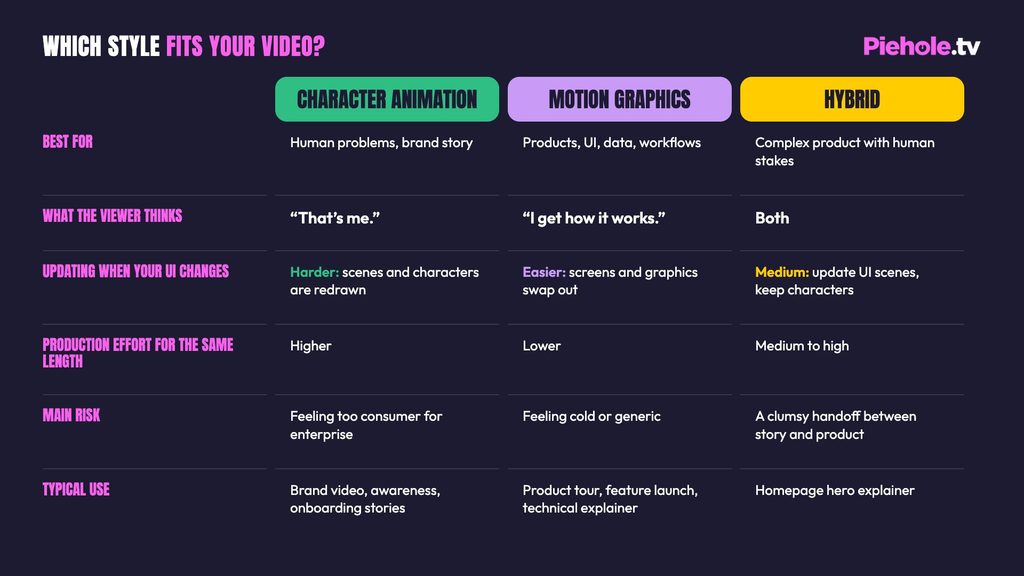
Character animation vs motion graphics: side by side
The Hybrid Approach
Can’t we just have both? Yes, and most of the time you should. Most of the B2B explainers we create use characters for empathy and motion graphics for understanding. Here’s how a typical hybrid flows:
- The hook (character): someone the viewer recognizes hits the problem.
- The meat (motion graphics): the product, workflow or data explains the solution.
- The close (character): the character comes back, better off, and the call to action lands.
Hybrid works especially well for complex platforms with high emotional stakes, like healthcare, compliance, security and finance, where buyers need to trust you and understand you.
Characters make people care. Motion graphics make people understand. The best B2B videos do both.
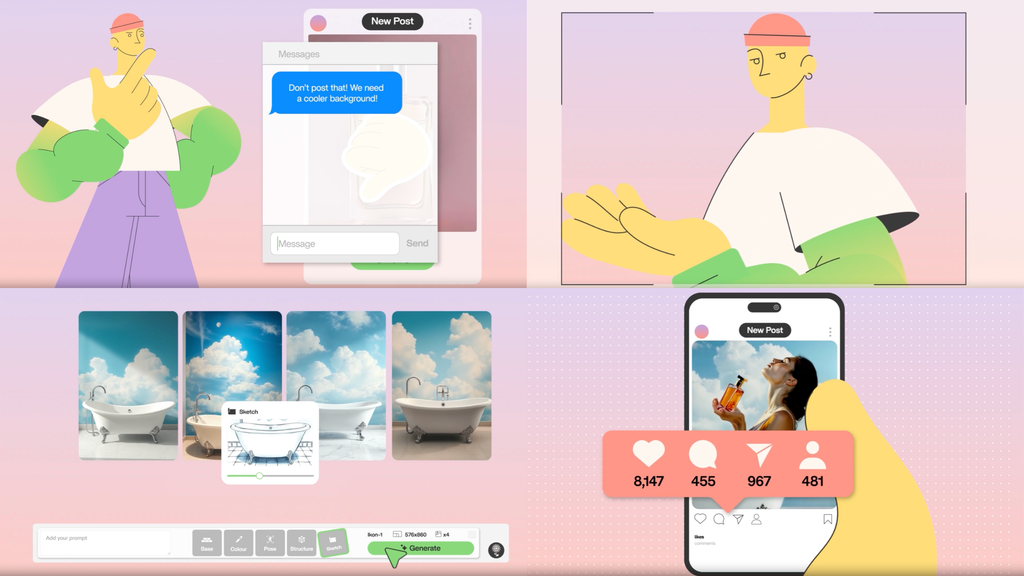
We used cel-animated characters plus technical motion graphics to show SaaS and eCommerce teams how to build and scale plugin ecosystems.
More hybrid examples:
- A software analytics product (screens and characters): a textbook hybrid. Characters frame the problem, real product screens carry the explanation.
- A workplace software company (colorful characters and screens): the same approach with a brighter, friendlier look.
2D or 3D? Where each fits in your strategy
Character vs motion graphics is about what’s on screen. 2D vs 3D is about how it’s drawn. Most B2B explainers are 2D: it’s faster to produce, easier to update and works for both characters and UI. 3D earns its place when you need to show something physical, futuristic or premium, like hardware, infrastructure or an AI system.
You don’t have to go all in, either. One AI product launch we made uses UI-led motion graphics with a short 3D opening scene, so the whole video gets that premium 3D moment while the rest of the production keeps moving at 2D pace. For fully 3D work, see our 3D AI product video and our futuristic 3D tech explainer. You can read more in our guide to 3D explainer videos.
Other styles worth exploring
Characters and motion graphics cover most B2B explainers, but they’re not the only options. Here’s the quick tour.
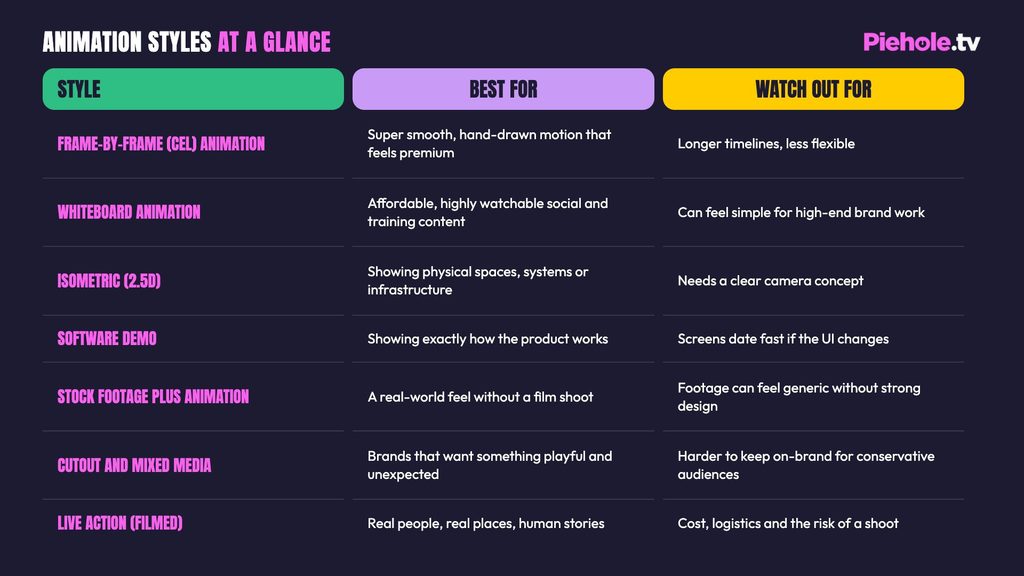
Our guide to the best video style for your business walks through these options, with examples.
Still not sure which style to use? These five questions will settle it in about two minutes.
How to choose: 5 questions to ask before you start your next explainer
- What job is this video doing? Awareness, explaining the product, launching a feature, or arming sales? Awareness leans character. Explaining and launching lean motion graphics.
- Is the core problem human or technical? Human problems start with characters. Technical systems start with motion graphics.
- How often does your product UI change? Quarterly or faster? Favor motion graphics, or keep characters out of the UI scenes so updates stay budget-friendly.
- Who’s watching, and what does your brand feel like? A technical evaluator wants proof. An executive wants the outcome. End users want to see themselves. A serious brand can still use characters, just in a cleaner, more corporate style.
- Where will it live? Homepage, LinkedIn feed, sales deck, or a trade-show monitor with the sound off? Silent placements need on-screen text and bold visuals, which motion graphics handle naturally.
What your style choice does to budget and timeline
Two questions come up on almost every sales call: “Why is an explainer video so expensive?” and “Why does video still take so long when AI has sped up everything else?” Fair questions, both of them. When you’re setting a budget for a short animation, style is one of the biggest levers on cost and time.
Here’s why. Character-led videos need character design, posing and acting in every scene, so they take more hours for the same runtime. Motion graphics reuse design systems, icons and UI assets, so they’re generally faster to make and cost-effective to update later. Hybrid sits in between, with a handy trick: keep the characters to the opening and the close. You get the emotional payoff without having character animation in every scene.
Our custom explainers typically sit in the $6,000 to $10,000 range and usually take 7 to 12 weeks from kickoff. If you need volume, like a series of feature videos or monthly content, a UI-led motion graphics system built once and reused is usually the most cost-effective path. That’s where a B2B video marketing team helps, and it’s what our SCALE team is built for.
Can animation style affect AI search visibility?
Indirectly, yes. AI engines and search crawlers read the text around a video, not the animation itself. Motion graphics often carry key messages as on-screen text, and crawlers can’t read that inside the video file.
Whichever style you choose, publish a full transcript, a short summary and descriptive metadata alongside the video. We go deeper on this in Everyone’s Talking About AI Search. Not Enough People Are Talking About Video.
FAQs
Neither is better on its own. Character animation suits videos built around a human problem, like a frustrated user or an overloaded team. Motion graphics suit videos that need to show a product, UI or data clearly. Many SaaS explainers use both: characters to set up the problem and motion graphics to explain the solution.
Usually, yes, for the same length. Character animation needs character design, posing and acting in every scene, while motion graphics can reuse design systems, icons and UI assets. Motion graphics are also more cost-effective to update when a product interface changes.
Yes. A hybrid video typically uses a character for the opening problem and the closing call to action, and motion graphics for the product explanation in the middle. That gives you the emotional pull of a character with the clarity of a product-focused explainer.
Motion graphics are the easiest to update, because UI screens and graphic elements can be swapped without redrawing scenes. In a hybrid video, keeping characters out of the UI scenes keeps future updates fast and affordable.
Not if it’s designed for the audience. Simple shapes, a restrained color palette and a story about real work problems keep character animation credible for enterprise buyers. The risk comes from consumer-style characters used for a technical or executive audience.
Final thoughts
Still not sure? That’s completely normal.
Most people come to us with a product they love and have no idea which style fits it. So here’s an easy next step: send us a link to your product, tell us who it’s for and where the video will live. Jay from our team will reply personally with a style recommendation and two reference videos from our portfolio. No commitment, just a straight answer.
OR
P.S. Want to see these styles side by side? Our portfolio lets you filter by Characters, Motion Graphic, Demo and High End. Fair warning: it’s very easy to lose an afternoon in there.